

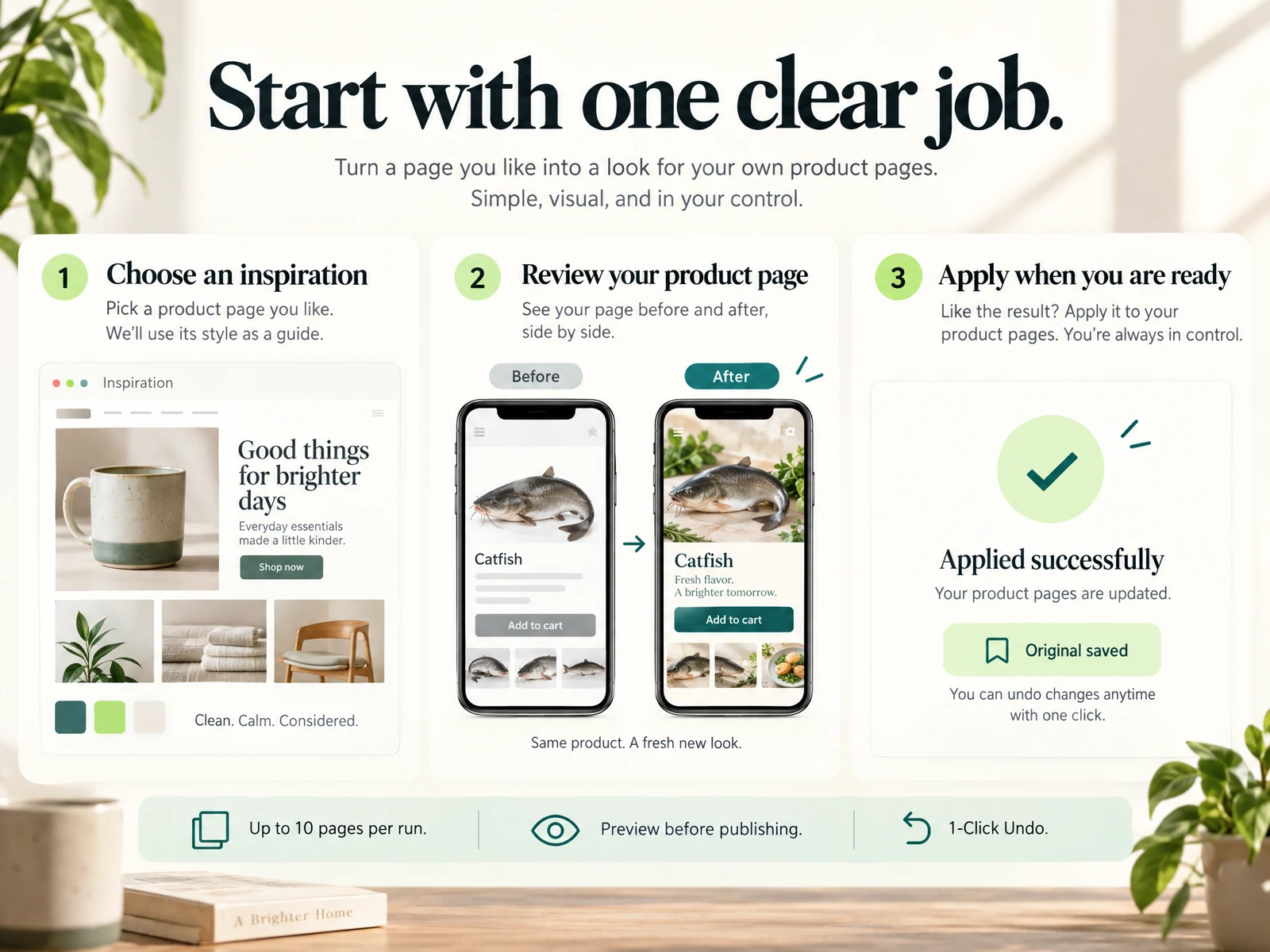
What merchants mean by 'AI agents' in the Shopify Admin
When merchants talk about AI agents inside the Shopify Admin they usually mean automated assistants that read store data, suggest content or take predefined actions. In practice, these agents vary from simple rule-based helpers to more complex systems that can draft product descriptions, recommend tags, or propose pricing changes. The important merchant view is practical: will this save time and produce outputs I can trust after a quick review?
Historically this language gained traction in 2023–2025 as stores experimented with automation. By 2026, merchants should treat 'AI agent' as a functional label, not a promise of flawless outcomes. An agent can speed repetitive tasks and surface ideas, but every suggested change should be checked for accuracy, brand voice, and potential customer impact.
- Think of agents as assistants — not decision-makers.
- Check agent outputs for brand voice and factual accuracy.
- Use agents for drafts, not final live changes without review.
Everyday workflows where AI agents can help
Practical uses include drafting product descriptions, producing meta descriptions, generating short blog post drafts, and suggesting image captions. For a merchant with a small catalog, an agent can produce first-pass text for 1–10 products, then you edit for tone and specifics. Agents are also useful for bulk tasks like normalizing tags or flagging inconsistent SKUs so you can address data hygiene quickly.
A recommended workflow: run the agent on a subset (one or two products), review and edit, then apply the refined prompt or style guide to the rest. This prevents mass updates that replicate a problem and keeps you in control while benefiting from speed gains. Keep a changelog or note of applied suggestions so you can revert or adjust later.
- Start with one or two items to vet style and accuracy.
- Use agents for drafts and bulk-normalization, not unsupervised publishing.
- Keep simple changelogs when applying bulk edits.

Limitations you should plan around
A generic connection between an AI agent and your Shopify Admin does not guarantee faithful visuals, clear layouts, or useful internal links. Agents often propose content that looks plausible but can contain outdated details, incorrect measurements, or product assumptions that only you can verify. Expect to spend time editing imagery captions, cross-linking to relevant collections, and ensuring layout elements preserve clarity on mobile.
Agents can also miss contextual store rules — shipping constraints, bundled discounts, or compliance notes — so incorporate checks for those in your review checklist. If your store relies heavily on curated images, handcrafted descriptions, or specialized specs, treat agents as helpers for time-consuming drafts rather than replacements for domain knowledge.
- Do not rely on agents to create perfect visuals or layouts.
- Verify product specs, pricing rules, and compliance items manually.
- Add cross-linking and internal links yourself after draft generation.
Practical review and approval steps
Create a short review workflow: generate, review, edit, preview, and publish. For each generated item, check five things quickly—accuracy of specs, brand voice, SEO-friendly phrasing, internal links, and visual alignment. Use the Admin preview to see how titles, descriptions, and images display on desktop and mobile before hitting publish.
If you work with a team, assign a responsible reviewer and set thresholds for when bulk actions are allowed. For example, approve automatic updates only if they pass a two-person review or if changes affect fewer than a set number of SKUs. These guardrails prevent accidental widespread edits and maintain product integrity.
- Follow a simple generate–review–preview–publish cycle.
- Check accuracy, voice, SEO, links, and visuals in preview.
- Use team approval thresholds for bulk updates.
Read the connected-content guide or explore product and blog specimens.
Sample merchant scenarios and decisions
Small-batch maker: You have 5 new hand-crafted items. Use an agent to draft product descriptions and image captions, but keep your unique material notes and handmade story intact. Run the agent on a single draft, edit to add production details and care instructions, then apply the refined prompt to the remaining four products to keep voice consistent.
Seasonal sale operator: For a 10-product collection update, use an agent to create sale banners and short promo copy. Preview carefully to make sure pricing and discount displays are correct and not in conflict with existing scripts or themes. If the agent suggests tags or collections, verify those links so customers land on intended category pages.
- Test an agent on one product before scaling to others.
- Keep handcrafted elements and key specs manually verified.
- Confirm discounts and promo displays in a live preview.
Choosing tools, costs, and keeping data safe
When evaluating tools, look for clear audit trails and preview capabilities. A merchant-friendly tool should let you preview suggested content and undo changes easily. Beware of solutions that promise perfect automation; instead prioritize tools that offer good previews, explicit save and undo options, and straightforward controls for the number of items processed per run.
Cost needs to match expected value: small catalogs rarely need high-volume plans. Consider one-time or annual pricing if you run occasional campaigns. Keep copies of original content before applying bulk edits and require confirmation steps for irreversible changes. Finally, always review agent output against verified facts and retain human oversight as your final checkpoint.
- Prefer tools with preview, undo, and explicit audit trails.
- Match pricing to catalog size and campaign frequency.
- Always save originals and use confirmation steps for bulk edits.
Will an AI agent write perfect product descriptions for my store?
No. AI agents can produce useful first drafts quickly, but their outputs often need editing for accuracy, brand voice, and specific product details. Treat generated text as a starting point and always verify measurements, materials, and claims before publishing.
Can I let an agent apply bulk changes without review?
It’s not recommended. Bulk automation can scale mistakes just as easily as fixes. Use a staged workflow: test on a subset, review and refine prompts, then apply with approval thresholds or human review in place.
How do I keep customer-facing visuals accurate after agent edits?
Always preview pages across desktop and mobile, check image captions and alt text, and confirm that internal links lead to the correct collections or product pages. Save originals so you can restore visuals if the agent’s suggestion doesn’t match your intended presentation.
Install OCTOshopX. Give your store one clear job.
AI agents can speed routine content and bulk tasks when used with a clear review process and practical guardrails. Start small, require preview and approval, and preserve originals so you can undo unintended changes. Install OCTOshopX.
A calm Shopify Product & Blog Studio: 5–10 useful visuals, connected articles and products, preview before publishing, and 1-Click Undo when needed.