


Why the 2025 Comparison Still Matters in 2026
Many merchants searching for ai content tools shopify cost comparison 2025 are trying to understand how pricing, feature trade-offs, and content quality evolved during a year when many platforms experimented with tiers and image budgets. That historical snapshot is useful because it shows common cost drivers: number of pages, visuals per page, revision rounds, and whether a solution bundled human review or just generative output.
In 2026 you’ll still see those same levers but with different packaging. Knowing what merchants paid and how they used tools in 2025 helps you predict which parts of a proposal are negotiable (for example, image-credit bundles or revision limits) and which are structural (base per-product or per-article processing). Use the 2025 comparison as a checklist when evaluating current offers.
- 2025 pricing clarified common cost drivers you’ll still face in 2026.
- Historical comparisons reveal negotiable extras versus base service elements.
- Use 2025 as a checklist, not as a direct price expectation.
Common Cost Components to Watch
Vendors typically break costs into predictable pieces: base license, per-item processing (products or articles), image generation or editing budgets, and human editing or review layers. For a small shop converting 1–10 product pages, the per-run and per-image line items will be the most visible costs; for larger catalogs, look for per-product volume discounts or capped monthly tiers.
Beyond these line items, watch for hidden practical costs: the time you spend reviewing outputs, re-mapping tags and collections to fit your store, and updating internal links. A cheap plan that produces poorly structured product descriptions can cost more in manual labor than a higher-priced plan with better fidelity and preview tools.
- Base license vs per-item processing — both matter for small runs.
- Image budgets and revision rounds are frequent add-ons.
- Factor merchant review and mapping time into true cost.
Workflow Examples and True Cost Calculations
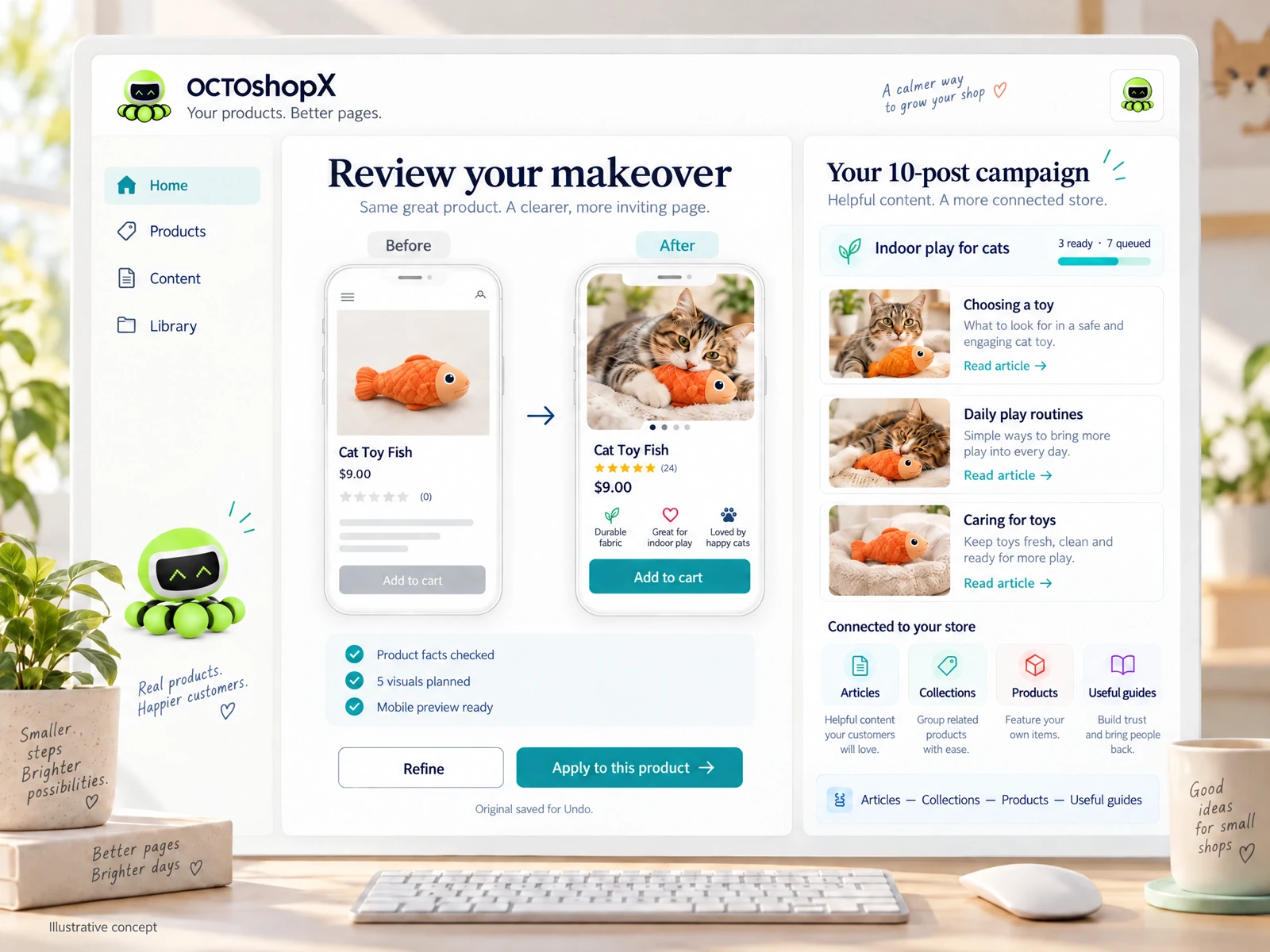
Example A: A one-person shop wants a 5-product refresh with five visuals each and two blog posts. True cost includes a per-run fee for the product refresh, per-visual charges (or use of an image budget), and time to review and apply previews. If the tool offers a preview and Undo (so you can see and revert changes), your hands-on time and risk are lower — reducing effective cost even if the nominal price is higher.
Example B: A merchant with seasonal collections (20 products) needs copy variations and internal link updates. Here the main costs are per-product processing and the labor to verify internal links and tags. If an option saves previews and preserves originals for Undo, you can run smaller batches and keep the store stable, which spreads cost over manageable intervals.
- Small refreshes: per-run and image counts dominate costs.
- Seasonal updates: per-product processing and verification labor scale cost.
- Preview and Undo features reduce effective cost by lowering review time and risk.
Quality vs Price: Where to Spend and Where to Save
Spend on features that directly reduce merchant time and customer-facing errors: preview before applying, original-saved Undo, connected articles/collections/products mapping, and visual fidelity that matches your brand. These features often cost more upfront but save hours of manual corrections and prevent broken layouts or misleading product lists.
Save on things that are easily validated or supplemented by internal processes: initial drafts that you plan to heavily edit, stock image choices you’ll swap, or non-customer-facing metadata that your team standardizes afterward. Be realistic: a cheaper AI output that requires substantial rewriting isn't a bargain if it replaces time you could instead use on product strategy.
- Invest in preview, Undo, and faithful visual/layout handling.
- Defer or DIY initial drafts you plan to heavily edit.
- Avoid saving on features that increase manual cleanup time.
Read the connected-content guide or explore product and blog specimens.
Evaluating Proposals: Questions to Ask Vendors
Ask for concrete examples of what’s included: number of products/pages per campaign, visuals per page, revision rounds, preview options, and whether originals are preserved. Don’t accept vague promises — a clear scope helps you compute cost per product or article and compare apples-to-apples between vendors.
Also ask how the tool helps with store structure: do outputs preserve or produce useful internal links, map to Collections, and suggest Related Products or Useful Guides? If the vendor only supplies a generic connection without layout fidelity or internal linking, you’ll likely pay more later to fix presentation and navigation.
- Request exact inclusions: products/pages per run, visuals per page, and preview policy.
- Confirm how outputs integrate with Collections, Articles, and internal links.
- Compare effective cost per product/article including review time.
Budgeting and Practical Procurement for 2026
Create a short budget worksheet: estimate number of products/pages, desired visuals per page, expected revision rounds, and internal review hours. Multiply vendor line items by counts, then add an hourly review cost estimate. This produces a realistic total you can compare to doing the work in-house or hiring a contractor.
When choosing a plan, prioritize a single predictable purchase for small refreshes over an unpredictable pay-per-use plan unless you truly have variable volume. For merchants needing one-off makeovers of 1–10 products/pages and up to ten related blog posts with previews and Undo, a single-run studio-style offering can be clearer and often more economical than piecemeal credits.
- Budget worksheet: line item counts + review hours = true cost.
- Prefer predictable single-run offerings for small, defined campaigns.
- Match vendor inclusions to your workflow to avoid surprise spend.
How should small Shopify shops model review time in cost comparisons?
Estimate a fixed hourly rate for the person who will review outputs and time a sample batch of two or three products. Multiply that by the total number of batches you’ll run. Include time for link verification, image swaps, and tagging — those steps are often underestimated in vendor quotes.
Do previews and Undo features materially change the real cost?
Yes. Previews let you reject or fine-tune outputs before they go live, reducing rollback labor. Originals-preserved Undo reduces risk and speeds rework if a page needs to be restored. These lower your effective operational cost even if the tool’s list price is higher.
Is per-item pricing always cheaper than a single-run studio approach?
Not necessarily. Per-item pricing can be cheaper for continuing large-volume workflows, but single-run studio packages often provide clearer inclusions (images per page, blog posts, previews) that minimize surprise spend for one-off makeovers of 1–10 products/pages and related articles.
Install OCTOshopX. Give your store one clear job.
Use the 2025 comparisons to prioritize what reduces your review time and prevents layout or linking errors. Choose a package whose inclusions match your scope, and always verify outputs against your product facts. Install OCTOshopX.
A calm Shopify Product & Blog Studio: 5–10 useful visuals, connected articles and products, preview before publishing, and 1-Click Undo when needed.