

What 'lifetime deal' usually means for merchants
In merchant marketing, a lifetime deal typically promises a one-time payment for ongoing access to a product or service. For AI tools that help with product descriptions, visuals, or blog content, that can sound attractive: pay once, avoid recurring SaaS fees, and lock in cost predictability for your store.
But 'lifetime' can be ambiguous. It may mean the lifespan of the product, the company, or a particular edition. For merchants, that distinction matters: a single payment does not guarantee future feature parity, model updates, or integration maintenance that keeps content accurate and presentable.
- Lifetime may refer to the current product edition, not perpetual feature updates.
- Check what parts of the AI service are included: models, visuals, article generation, or only basic features.
- Expect to verify terms for preview, undo, and original content retention.
Practical value for small Shopify catalogs (1–10 products/pages)
If you run a small catalog or are planning a focused refresh of up to ten products/pages, a lifetime-style one-time purchase can be cost-effective. The arithmetic is simple: compare one-time cost to the annual or multi-year subscription fees you would otherwise pay, matching the AI outputs to the number of pages and visuals you need.
However, real value depends on the art-of-the-deal: preview options, the number of visuals per page, and the ability to undo or save originals. For merchants, being able to preview and revert content keeps product pages stable while you experiment—especially important during promotions or seasonal rollouts.
- Map expected runs: how many products/pages and visuals you need now and next 12 months.
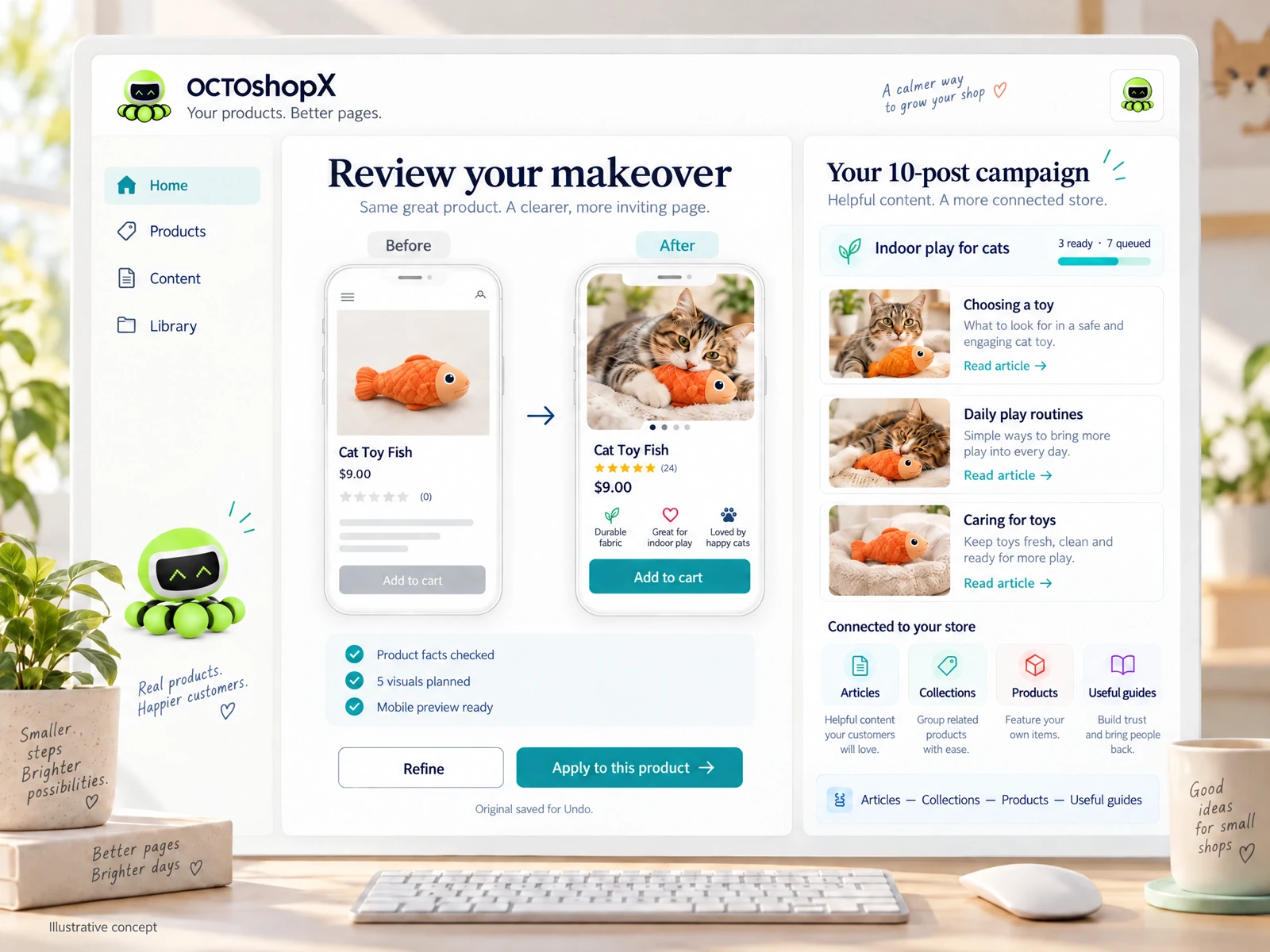
- Require preview and undo features to safely apply AI makeovers to live listings.
- Prefer deals that include blog/article generation if you publish guides or collections.
Risks: model drift, compatibility, and maintenance
AI models and integrations evolve. A one-time purchase may not include future model improvements or compatibility updates with your theme or apps. Merchants should assess how the product handles updates, whether previews reflect current store layouts, and if internal links, reviews, or layout fidelity are preserved after automation.
A generic connection to your store doesn’t guarantee faithful visuals or clear internal links. Good deals provide previewing within the exact template and keep originals so you can revert; poor deals may require extra manual cleanup that erodes the one-time saving.
- Confirm whether the offer includes preview within your store’s template.
- Ask about original-content saves and undo capability before buying.
- Plan for manual checks of links, reviews, and layout after any AI change.
Operational workflows that preserve control
Adopt a staging-first workflow. Use previews to evaluate outputs on a staging copy or with preview tools, then apply changes to a subset of products. For merchants doing category-wide updates, roll out in batches and monitor conversions, load times, and visual fidelity.
Document each campaign: which prompts or settings you used, which products were modified, and save the original content. That documentation reduces risk and helps you reproduce or reverse a successful variation without repeating trial-and-error on live pages.
- Run campaigns in small batches and review before full application.
- Keep a simple changelog for each AI makeover campaign.
- Back up originals to restore quickly if a layout or content issue appears.
Read the connected-content guide or explore product and blog specimens.
How to evaluate claims and fine print
Read the offer terms for update and support windows. Some lifetime-style offers include a year of major updates and support, then optional renewals for continued major releases—important if the vendor plans frequent model upgrades. Confirm whether image budgets, advanced features, or multi-store rights are included or sold separately.
Ask direct operational questions: How many previews or visuals per page? Are blog posts included? Can you apply changes to multiple stores? Practical answers about limits (for example, 1–10 products per run or a fixed number of visuals) are more useful than marketing blurbs.
- Verify included quantities: products/pages per run, visuals per page, blog posts per campaign.
- Check support and update policy after the initial period.
- Clarify multi-store rights and optional renewal costs.
When a lifetime deal AI software worth it for your shop
A lifetime-style purchase can be worth it when the deal explicitly matches your workflow: limited-run makeovers, predictable number of pages, and strong preview/undo safeguards. If you need up to ten pages per campaign, several visuals per page, and connected articles, a one-time purchase that covers those specifics avoids recurring fees and simplifies budgeting.
If your store plans continuous large-scale content churn, frequent model-driven improvements, or expansion across many stores, a recurring subscription with ongoing updates and support may be safer. In practice, merchants often pair a lifetime-style purchase for periodic makeovers with a smaller operational plan for ongoing needs.
- Good fit: fixed-scope refreshes and predictable campaign cadence.
- Less fit: constant large-scale content churn or multi-store expansion.
- Consider pairing a lifetime buy for major makeovers with occasional renewals or support plans.
Does a lifetime deal usually include model updates?
Not always. Many one-time offers include a period of major updates and support, then charge for continued major releases. Confirm how long updates are covered and whether critical model improvements or integration fixes are included.
How should I test AI-generated visuals and copy safely?
Use previews and a staging workflow. Apply changes to a small batch of products first, keep originals saved, and document prompt/settings. Check layout fidelity, internal links, reviews, and load performance before broader rollout.
What costs should I watch beyond the one-time price?
Watch optional renewals for continued updates/support, image or usage budgets, additional store licenses, and the potential time cost of manual cleanup if previews aren’t faithful. Factor these into your total cost of ownership.
Install OCTOshopX. Give your store one clear job.
Balance immediate savings against long-term needs: verify preview, undo, update terms, and exact campaign limits before you buy. Install OCTOshopX.
A calm Shopify Product & Blog Studio: 5–10 useful visuals, connected articles and products, preview before publishing, and 1-Click Undo when needed.