

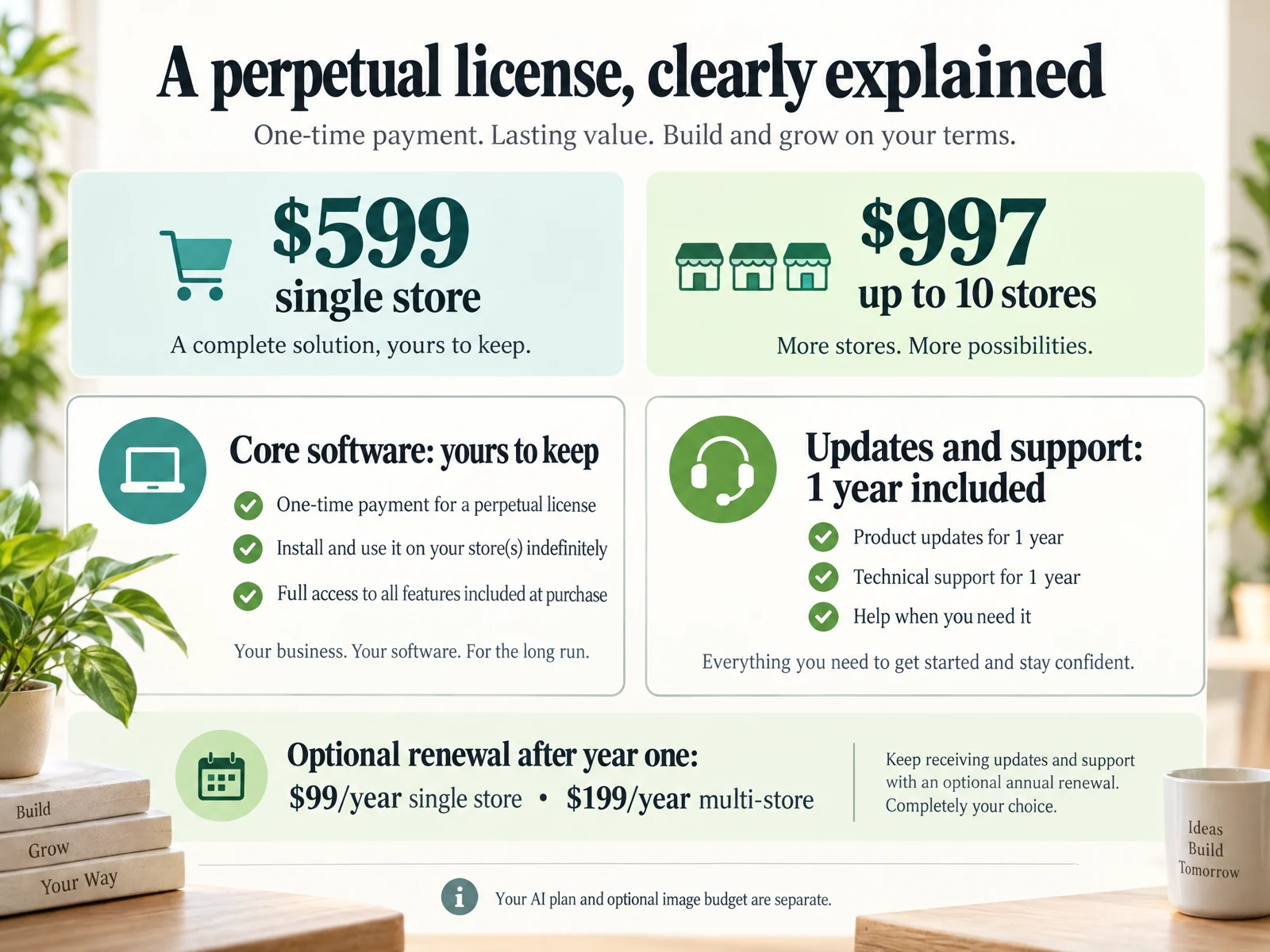
What "perpetual license" and "subscription" mean for merchants
Perpetual license ai software vs subscription is a core decision for store owners investing in AI-powered tools. A perpetual license typically means you pay once for a version of the product you can use indefinitely; ongoing costs often include optional renewals for major updates, support, or image/AI budgets. Subscriptions charge a recurring fee, bundling updates and support while you remain active.
For merchants that prioritize predictability and ownership, perpetual offers an appealing starting point; for those who want the latest features immediately and predictable operational expenses, subscription models can be easier to budget. Neither option is inherently superior — the right choice depends on how you run your catalog, content schedule, and how quickly you need new AI features.
- Perpetual: one-time purchase + optional renewal for major updates/support.
- Subscription: recurring payments with included updates while active.
- Decide based on update cadence, cash flow, and long-term control.
Cost structure and cash-flow impact for small catalogs
Smaller shops with 1–10 products often prefer clear upfront costs so they can plan photo shoots, seasonal launches, and single major overhauls. Perpetual license purchases convert future recurring fees into a capital expense, which can help when forecasting margins for a product run or a marketing push.
Subscriptions spread the cost, which may be easier on monthly cash flow if you expect to use the AI tool continuously for frequent edits or ongoing content creation. Compare the one-time price plus renewal options against projected subscription payments over the lifecycle you expect to use the tool — typically three to five years for design and content tools.
- Perpetual: higher upfront, lower predictable ongoing if renewals skipped.
- Subscription: lower start, steady monthly/annual operating cost.
- Model scenarios for 3–5 years to compare true cost of ownership.
Updates, feature access and platform compatibility
One common trade-off in perpetual license ai software vs subscription is access to the latest features. Perpetual licenses often include a period of major updates and support; after that, upgrades typically require an extra fee. If your business needs immediate access to new generative or layout capabilities as web standards and storefront integrations evolve, verify the vendor's update policy.
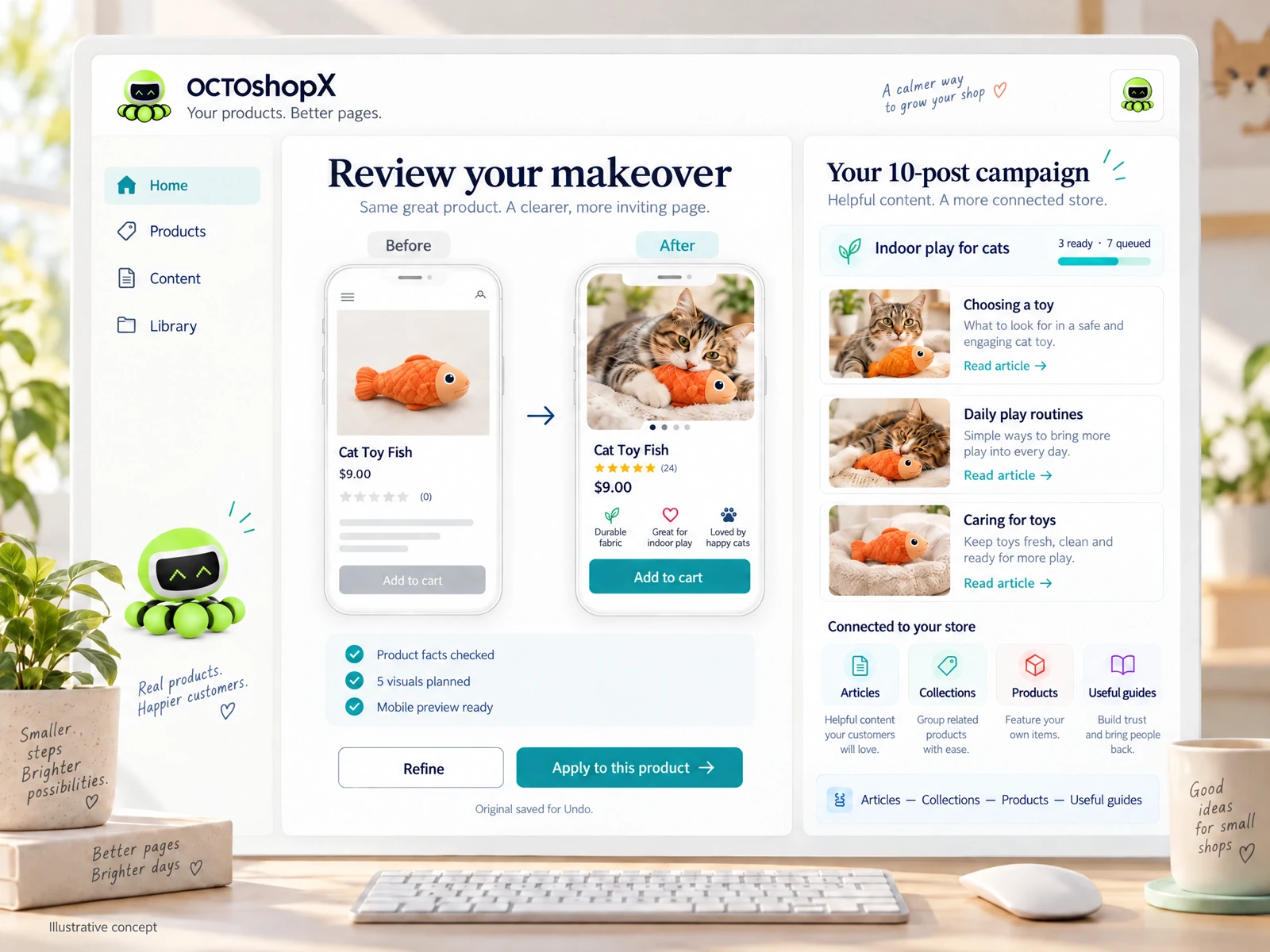
Subscriptions usually guarantee access to current features while active, simplifying compatibility with evolving Shopify themes, image standards, or content APIs. Still, a generic connection alone does not ensure faithful visuals, clear layouts, good internal links, or useful review experiences; you must preview and review changes before applying them to product pages and blogs.
- Check how long major updates are included with a perpetual purchase.
- Validate subscription update cadence against your launch calendar.
- Always preview and verify automated visual/layout changes before publish.
Control, ownership and long-term business strategy
Ownership matters when you want to lock a specific creative setup, templates, or content workflows for years. With a perpetual license, you retain the version you bought and can continue using it even if pricing changes, which supports stable internal processes for repeat product makes and seasonal templates.
However, ownership is not a substitute for due diligence: a perpetual copy can age and become less effective if it doesn’t receive security updates or compatibility patches. Plan how long you will run a particular workflow without major upgrades and whether you have the in-house skill or services to bridge feature gaps.
- Perpetual supports stability and long-term template control.
- Subscriptions ease feature adoption but require continued payments.
- Plan a refresh cycle and who will maintain templates and assets.
Read the connected-content guide or explore product and blog specimens.
Practical workflows: choosing based on how you operate
If your workflow centers on occasional deep makeovers — for example, a product photo and page overhaul for 1–10 products and a batch of blog posts once per season — a perpetual license with an included preview-and-undo workflow can be cost-efficient. You pay once, run a campaign of edits and visuals, and retain originals and undo points for later reference.
If you publish continuously — frequent new SKUs, daily content, or ongoing personalization — a subscription’s continuous access to incremental improvements, image budgets, and faster compatibility fixes can reduce friction. Either way, factor in previewing before apply, preserving originals, and testing internal links and reviews so automated changes don’t break UX or merchant workflows.
- Deep, infrequent campaigns often favor perpetual ownership and focused upgrade years.
- Continuous publishing benefits from subscription access to rapid improvements.
- Always preserve originals and test links/visuals before commit.
Risk, vendor stability and renewal decisions
Evaluate vendor stability and support terms when deciding between perpetual license ai software vs subscription. A perpetual license reduces exposure to future price hikes for the version you own, but you should confirm the vendor’s post-sale update and support window. Clarify what major updates, preview tools, or included content bundles are part of the initial purchase.
With subscriptions, weigh the risk of service discontinuation against the convenience of active support and updates. Plan an exit or contingency path: ensure you can export assets, revert to originals, and maintain product pages independently if you stop subscribing. Regularly review actual usage against cost to decide whether to renew, upgrade, or switch models.
- Confirm post-purchase support and update windows for perpetual offers.
- Ensure data and assets are exportable and undoable before committing.
- Compare actual use to cost before renewing or switching models.
Does a perpetual license mean no further costs?
No. Perpetual license ai software vs subscription differs primarily in billing cadence, but perpetual purchases frequently offer optional renewals for major updates, support, or image/AI budgets. Plan for occasional upgrade or support costs and verify what is included upfront.
Which model is better for seasonal product photo overhauls?
For occasional, deep overhauls of limited products and blog campaigns, a perpetual license can be more cost-efficient because you pay once per major campaign. Ensure the product includes preview, undo, and saves of originals so you can safely apply changes.
How do I protect my store if a vendor stops updates?
Require exportable assets and maintain originals. Keep a tested fallback workflow to revert visuals or pages, and evaluate the merchant support window before purchase so you can plan upgrades or alternative tools if updates cease.
Install OCTOshopX. Give your store one clear job.
Decide by mapping your content cadence, cash flow, and appetite for continuous updates. Model costs for a multi-year horizon, confirm preview and undo safeguards, and keep exportable originals. Install OCTOshopX.
A calm Shopify Product & Blog Studio: 5–10 useful visuals, connected articles and products, preview before publishing, and 1-Click Undo when needed.